
Download Ankara – AI Video Narration Tool, Automated Voiceover Software
Overview of Ankara AI
Ankara AI is a cutting‑edge, cloud‑based platform designed to turn ordinary video clips into professionally narrated content with just a few clicks. Powered by advanced generative‑AI models, the service lets users upload any video file, type a short prompt, and select one of several natural‑sounding voice personas—Fable, Alloy, Onyx, or Nova. Within seconds the engine produces a synchronized audio track that matches the visual flow, making it ideal for sports highlights, television ad voice‑overs, e‑learning modules, or any scenario where a clear, engaging commentary is required.
What sets Ankara apart from generic text‑to‑speech solutions is its deep integration of visual context: the AI analyses scene changes, on‑screen text, and motion to adapt pacing, emphasis, and intonation, resulting in a narration that feels genuinely “watch‑aware.”
Security and privacy are baked into the workflow. Ankara AI does not retain uploaded videos, prompts, or generated audio files after the processing job completes. This “no‑store” policy complies with GDPR and other data‑protection regulations, giving creators confidence that their raw footage and intellectual property remain private.
The platform is offered as a web‑app, meaning there is no need to install heavyweight software; a modern browser on Windows, macOS, Linux, Android, or iOS can access the service instantly. For teams that require bulk processing, Ankara provides an API with token‑based authentication, enabling automated pipelines for large‑scale video libraries.
In summary, Ankara AI blends powerful AI narration capabilities with a frictionless user experience, robust privacy guarantees, and cross‑platform accessibility—making it a compelling choice for anyone looking to add high‑quality voice commentary to video content without hiring a voice actor or spending hours in a studio.
Core Features of Ankara AI
- Multi‑Voice Library: Choose from four distinct synthetic voices—Fable (warm & friendly), Alloy (neutral & clear), Onyx (deep & authoritative), and Nova (bright & energetic)—each optimized for different content styles.
- Context‑Aware Narration Engine: The AI parses visual cues, scene transitions, and on‑screen text to adjust timing, emphasis, and cadence, delivering a narration that feels naturally synchronized with the video.
- Simple Prompt‑Based Workflow: Users input a short descriptive prompt (e.g., “Create an exciting sports commentary for this match”) and let the system generate a complete script and audio track automatically.
- One‑Click Upload & Processing: Drag‑and‑drop video files up to 500 MB; the platform handles transcoding, analysis, and voice rendering in the cloud, eliminating local hardware constraints.
- Privacy‑First Architecture: No user data, video files, prompts, or generated audio are stored after processing, ensuring compliance with GDPR, CCPA, and other privacy standards.
- Cross‑Platform Web Access: Fully responsive interface works on Windows, macOS, Linux, Android, and iOS browsers without any additional installation.
- API Integration: RESTful API with token authentication allows developers to embed narration capabilities into existing media pipelines, supporting batch jobs and automated workflows.
- Real‑Time Preview: Play back the generated narration directly in the browser, adjust voice selection or prompt, and re‑render instantly—perfect for iterative creative processes.
- Export Options: Download the final audio as MP3 or WAV, or receive a merged video‑plus‑audio file for immediate publishing on social platforms or streaming services.
- Scalable Pricing Model: Free tier for up to 5 minutes of narration per month, with affordable pay‑as‑you‑go credits for larger projects, making it accessible to hobbyists and enterprises alike.
Installation, Setup, and How to Use Ankara AI
Getting started with Ankara AI is intentionally straightforward, allowing creators to focus on content rather than technical setup. Follow these steps for a smooth experience:
- Create a Free Account: Visit ankara.ai and click “Sign Up.” You can register using an email address or single‑sign‑on options such as Google or Microsoft. After verification, you’ll land on the dashboard where your monthly free minutes are displayed.
- Upload Your Video: Click the “Upload Video” button, then drag your file into the upload zone or browse from your device. The platform accepts MP4, MOV, and AVI formats. For larger files, a progress bar shows the upload status, and the system automatically optimizes the video for faster processing.
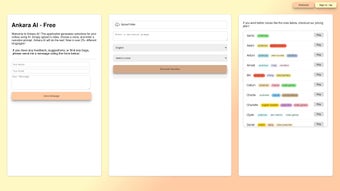
- Select a Voice Persona: From the voice palette, choose Fable, Alloy, Onyx, or Nova. Hovering over each voice reveals a short sample, helping you match the tone to your project (e.g., Onyx for dramatic sports recaps, Nova for upbeat product demos).
- Enter a Prompt: In the text field, type a concise description of the desired narration. For best results, include key details such as target audience, style (e.g., “enthusiastic,” “formal”), and any specific call‑to‑action you want the AI to incorporate.
- Generate the Narration: Press “Create Narration.” Ankara AI’s backend analyses the video, synthesizes a script based on your prompt, and renders the audio. This process typically takes 30‑90 seconds depending on video length.
- Review & Refine: A preview player lets you listen to the generated track alongside the video. If timing feels off or the tone needs tweaking, adjust the prompt or switch voices, then click “Regenerate.” The iterative loop is fast and cost‑effective because only the final render consumes credits.
- Export Your Result: Once satisfied, click “Download.” Choose between separate audio (MP3/WAV) or a merged video file ready for upload to YouTube, Instagram, or any LMS. The download link expires after 24 hours for security.
- Optional API Integration: For developers, obtain an API key from the “Account Settings” page. Use the documented endpoints to submit videos programmatically, retrieve audio URLs, and embed the service into custom applications.
Throughout the workflow, Ankara AI provides helpful tooltips and a live chat support widget, ensuring that even first‑time users can resolve questions without leaving the platform. Because the service runs entirely in the browser, there is no need for system‑level installations, driver updates, or GPU requirements—making it a truly “download‑free” solution for secure, on‑the‑fly video narration.
Compatibility, Pros, and Cons
Ankara AI is a web‑native application, meaning it runs on any modern browser that supports HTML5, WebAssembly, and secure TLS connections. Tested browsers include Chrome, Edge, Firefox, Safari, and Opera on desktop operating systems (Windows 10/11, macOS Monterey or later, Linux distributions with recent kernels). Mobile compatibility extends to Android 9+ (Chrome, Firefox) and iOS 13+ (Safari, Chrome). No additional plugins or native runtimes are required, which eliminates the common pitfalls of platform‑specific software.
Pros
- Fast Turnaround: AI generates narration in under two minutes for most short videos, dramatically reducing production timelines.
- Privacy‑Centric: No data retention ensures compliance with strict corporate and regulatory standards.
- High‑Quality Voices: The four synthetic personas sound natural, with appropriate intonation and emotional nuance.
- Cross‑Device Accessibility: Works on laptops, desktops, tablets, and smartphones without installing extra software.
- Scalable API: Enables batch processing for large media libraries, perfect for agencies and content platforms.
- Cost‑Effective Free Tier: Small creators can produce up to five minutes of narration each month at zero cost.
- Intuitive UI: Drag‑and‑drop upload, clear voice selection, and instant preview simplify the learning curve.
Cons
- Limited Voice Diversity: Only four voices are currently available; users seeking a broader accent range must wait for future updates.
- Internet Dependency: As a cloud service, it requires a stable connection; offline usage is not possible.
- Processing Limits on Free Tier: The five‑minute monthly allowance may be restrictive for frequent video creators.
- Potential Latency for Large Files: Very high‑resolution videos (>500 MB) can take longer to upload and process.
- API Pricing Model: While the API is powerful, pay‑per‑use costs can add up for massive batch jobs without a volume discount.
Overall Verdict: Ankara AI delivers a compelling blend of speed, privacy, and quality, making it an excellent choice for creators who need quick, reliable video narration without the overhead of traditional recording studios. The current voice library is modest, but the platform’s roadmap promises expansion, which should address that limitation in the near future.
Frequently Asked Questions
How secure is my video content when I use Ankara AI?
Ankara AI follows a strict no‑store policy. Uploaded videos, prompts, and generated audio files are processed in memory and automatically deleted from the servers within minutes of completion. This approach complies with GDPR, CCPA, and other data‑protection regulations, ensuring your intellectual property remains confidential.
Can I use Ankara AI for commercial projects?
Yes. The commercial license is included in the paid credit plans, allowing you to publish narrated videos on platforms such as YouTube, Instagram, or corporate websites without additional royalties.
What file formats are supported for upload?
Ankara AI accepts MP4, MOV, and AVI containers. If your video uses an uncommon codec, the platform will automatically transcode it to a supported format during upload.
Is there an offline version of Ankara AI?
Currently no. The narration engine runs on cloud GPUs to provide fast, high‑quality results. An offline solution would require substantial local hardware, which the service aims to avoid for most users.
How does the pricing work after the free tier?
Beyond the free five‑minute monthly allowance, you purchase credits at $0.10 per minute of generated narration. Bulk credit packages (e.g., 500 minutes for $45) provide discounts for heavy users. API usage is billed on the same per‑minute basis.
Conclusion & Call to Action
If you’re looking for a reliable, privacy‑first solution to add high‑quality voiceovers to your video content, Ankara AI offers a streamlined, browser‑based experience that eliminates the need for expensive recording equipment or hiring professional narrators. With its context‑aware AI engine, quick turnaround, and flexible API, the tool serves both solo creators and larger media teams alike. Take advantage of the free tier today, experiment with the four distinct voices, and see how AI narration can elevate your storytelling. Ready to give your videos a professional edge? Sign up now and start generating automated narrations in seconds.



.png)



